- Navigate to the town website: https://town.pepperell.ma.us
- in top right corner click the Website Sign In button
- Log in with your username & password
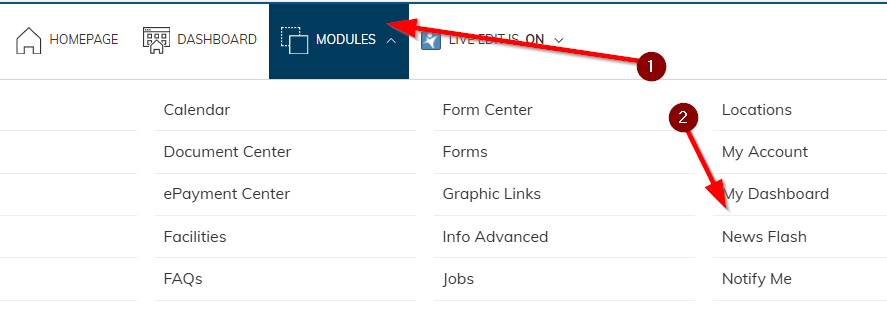
- From the top white menu bar choose MODULES -> News Flash
Note:
The Pepperell News & Notices category is the most common choice. It applies to the town’s HOME PAGE (the front page).
Other categories may be linked to specific pages. For example, the Highway Department’s News Flash category might only appear on the highway page, not the front page—unless you decide to link it there as well.
If you're unsure which category to select, simply choose the Pepperell News & Notices category by clicking on it.
- Click the ADD ITEM button

- Notice the yellow save as well as the save & publish buttons on top, save lets you save your work without posting the news flash, save and publish makes your news flash visible to the public. Most often you will use the save and publish
- Fill out the Display starting on / stopping on fields
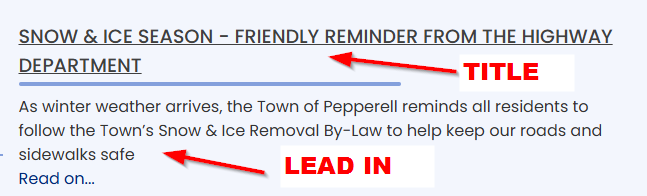
Note: if start time/end time is not used, civicplus uses midnight as the cut-over time. If you wish your news flash be visible from 1/10 to 1/12 , enter 1/10 as starting on and 1/13 as stopping on date. - Enter the Title of your news flash
- Lead in is a limited space to summarize your information in plain text
- Full text allows you to enter all of the news flash information and format it as you wish. When the user clicks the "read on" link they will see the full text of your news flash.
- Featured? Please do not use this checkbox. It puts yours news flash on the top, but then everyone else will use it and we end up fighting over who's featured more :)

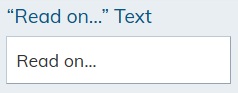
- Read on text, you can modify what the "see full text" link says, by default it will be read on, but you can customize it if you wish.
- Related Categories
- If you picked the Pepperell News & Notices category then ignore this section.
- If you picked a specific department category (ex: Highway) and wish to ALSO show your news flash on the front page, then select Pepperell News & Notices
- Scroll back up and click the Save and Publish yellow button.
- Re-visit https://town.pepperell.ma.us and ensure your news flash looks and acts as intended.
Was this article helpful?
That’s Great!
Thank you for your feedback
Sorry! We couldn't be helpful
Thank you for your feedback
Feedback sent
We appreciate your effort and will try to fix the article