Posting Process / Quick overview:
- Create your agenda in CivicPlus
- Send link to your agenda to the agendas@town.pepperell.ma.us email , request that it is posted
- Town Clerk posts your agenda and if necessary creates the GoTo meeting event.
To Post a Simple Agenda
- Navigate to https://town.pepperell.ma.us
- Click the Website Sign In button in top right corner
- Sign in with your username/password
- From the white top menu bar, choose MODULES -> AGENDA CENTER
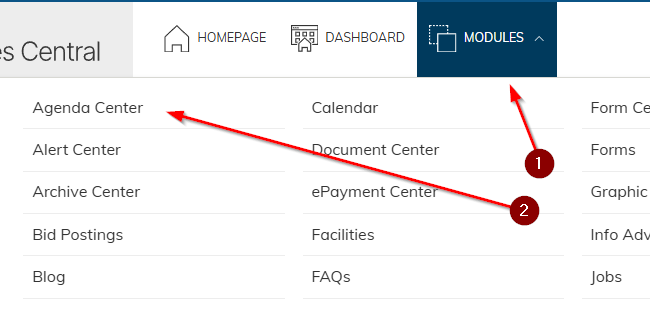
- Choose the appropriate category (department) by clicking on its name
- Click the yellow ADD AGENDA button

- Fill in the Meeting Date
- Click the Upload an Agenda checkbox

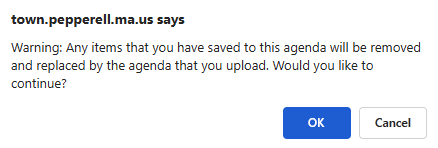
- You will receive a warning that this action is irreversible, this is fine, click on OK
- Fill in description - this is often just name of the board, such as Select Board. For unique/special meetings you may append additional description such as Select Board - Executive Session
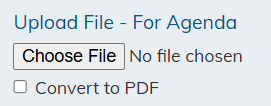
- Scroll further down and click the choose file button under "Upload File - For Agenda". Select the file and it will automatically upload.
note:
- Only PDF Formats are acceptable.
- You may upload a Microsoft Word document and select the Convert to PDF checkbox to convert it to PDF.
- If you are uploading a PDF file then only digital PDF documents may be uploaded. You cannot scan a paper agenda into PDF, this is not an acceptable format.
12. Scroll back up, click the SAVE AND PUBLISH yellow button 
13. You will be returned back to your department category list of agendas. In this list locate the just-posted agenda (likely the top most item)
14. Click the Actions button next to this latest agenda
15. Choose COPY LINK option
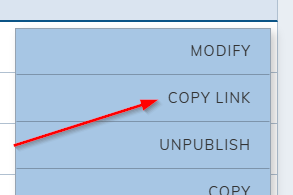
16.Click the COPY button for the BOTTOM link, the full link that begins with https://town....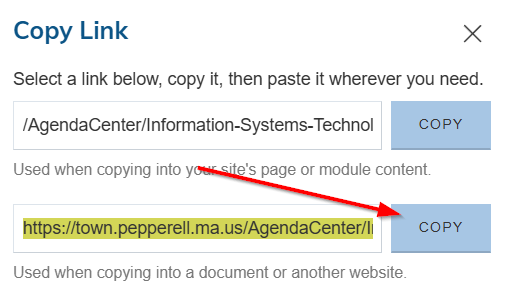
17. Open your email, create a new message, paste the link to your agenda into the body of the email, email agendas@town.pepperell.ma.us to request posting of your agenda. This distribution list goes to Town Clerk's
department.
Was this article helpful?
That’s Great!
Thank you for your feedback
Sorry! We couldn't be helpful
Thank you for your feedback
Feedback sent
We appreciate your effort and will try to fix the article