All Town systems are pre-installed with software named PDFSam Basic.
PDFSam Basic is a free, open‑source tool that lets you quickly split, merge, rotate, extract, and mix PDF files—ideal for everyday document tasks without needing a paid editor.
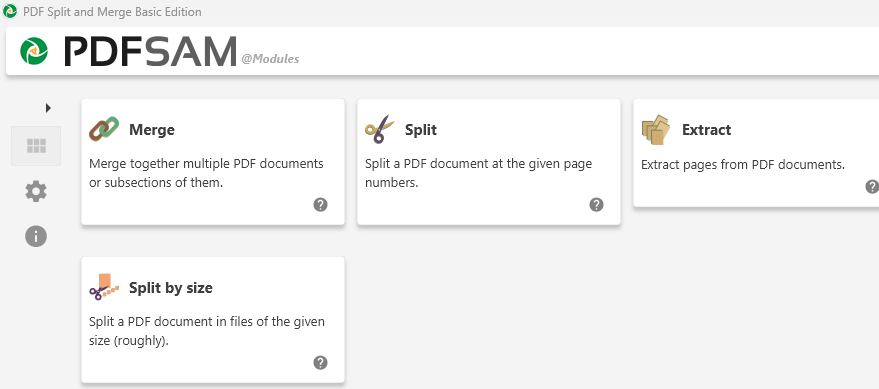
What PDFSam Basic Can Do
? Merge PDFs
Combine multiple PDFs into one file.
Merge full documents or select specific page ranges (e.g., 1–10, 14, 25–).
Control how bookmarks and form fields (AcroForms) are handled.
? Split PDFs
Split at specific page numbers.
Split by bookmark level.
Split into equal-sized files or by file size.
? Extract Pages
Pull out selected pages into a new PDF.
? Rotate Pages
Rotate individual pages or entire documents.
? Mix PDFs
Interleave pages from two PDFs (e.g., alternate pages from each).
? Reorder & Organize
Drag‑and‑drop interface for rearranging pages.
Create or modify bookmarks for easier navigation.
How To: Open PDFSam Basic
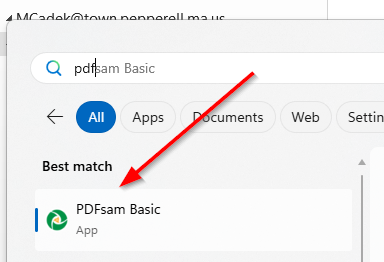
1) click the windows/start button
2) start typing PDFSam... to search for the application
- if you cannot find PDFSam - please contact IT
3) Launch the application by clicking on it
4) Choose the feature, in this example I will combine/merge multiple PDF files into one
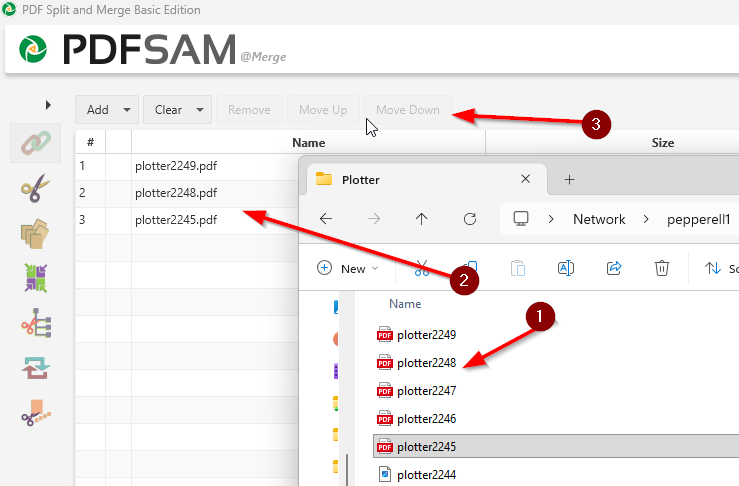
5) Open a windows file explore to locate your PDF files, click & drag them into the PDF same window (1) & (2) , you may reorder them as you wish using the Move up/Move Down buttons (3)
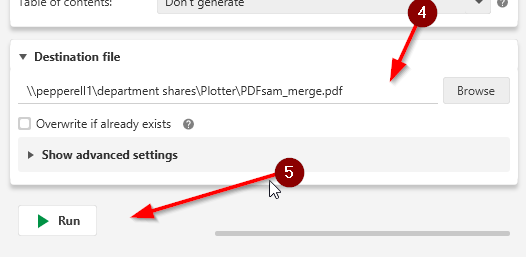
6) Choose where you wish to save your merged file to (4) (click the Browse button or type in the path), and finally clink the RUN button (5) to generate the file.
Was this article helpful?
That’s Great!
Thank you for your feedback
Sorry! We couldn't be helpful
Thank you for your feedback
Feedback sent
We appreciate your effort and will try to fix the article