The purpose of this article is to outline a practical path for generating meeting minutes from a GoTo Meeting transcript using a single AI agent. This is not a definitive or one‑size‑fits‑all guide — you will need to invest time refining, testing, and customizing prompts to match your workflow. Every meeting is different, everyone's expectations and goals differ and AI tools vary widely in how they interpret transcripts. You may decide the results aren’t always worth using, but with well‑designed prompts, any modern large language model can significantly reduce the time required to produce accurate, consistent meeting minutes.
CRITICAL RULE: Never upload personal information into any AI system. While this specific work typically involves public meeting materials, it is still your responsibility to safeguard resident and Town data. Once sensitive information is uploaded, you lose control over how an AI system may store, use, or potentially leak it in the future.
Overview:
0) Choose the AI agent
1) Retrieve the transcript
2) Identify required prompt
3) Convert Transcript into Minutes
4) Review for accuracy
5) Additional Notes
In this example I will use a random Board of Health Meeting.
0) Choose the AI agent
In this example I’m using Microsoft Copilot. The specific AI model isn’t important—pick one you like and stick with it, because results will vary between platforms. Gemini, ChatGPT, Claude… any of them can handle a task this simple. Copilot just happens to be built into Windows, so it’s always right there for me. All major AI tools offer free accounts. After a few uses you’ll be prompted to create one, but for this workflow a paid tier isn’t necessary.
1) Retrieve the Transcript
- Navigate to www.goto.com
- Sign in with the account that was used to record your meeting, this information is provided to you by our Clerk's office
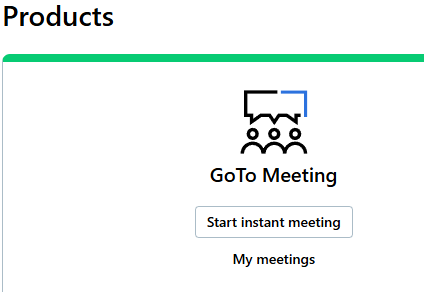
- Click on My Meetings
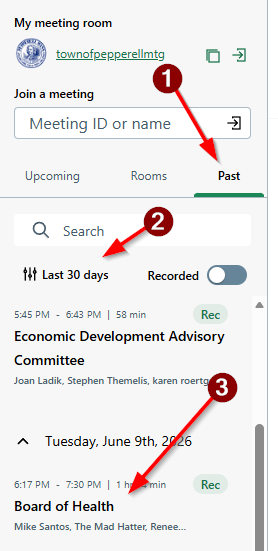
- Click on Past meetings and select your meeting. Note: default filter shows 7 days of meetings, you may need to change it to 30.
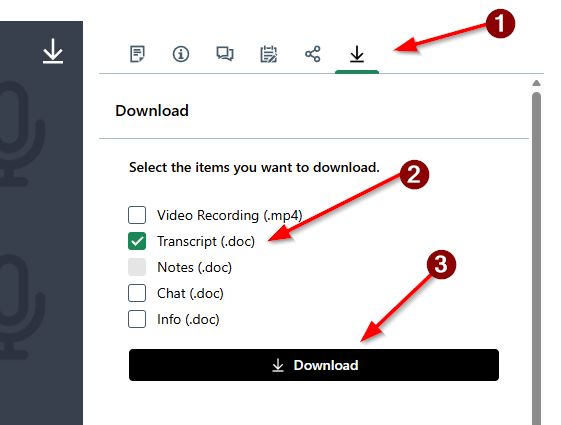
- Click the download menu, select only the transcript, click the download button
- Go to your downloads folder, move the MS Word file of the transcript to a place where you can find it later (or remember that it is in the downloads folder)
- Note: You may open this word file and edit it to get better results, maybe there is a section you want to remove (discussion before beginning of the meeting or after adjournment, remember this transcript is based off a RAW video that may include things that do not belong in your minutes), maybe you wish to identify when public comment section began and ended etc..
2) Identify required prompt
This is the fun part, your job is to come up with one or multiple prompts to help the AI generate the result you are happy with. Trial & Error will be paramount, but once your prompt is good enough you can get repeatable results for next meeting by saving that prompt and reusing it later.
I have found the agenda for this meeting at https://town.pepperell.ma.us
I also have the transcript from step #1
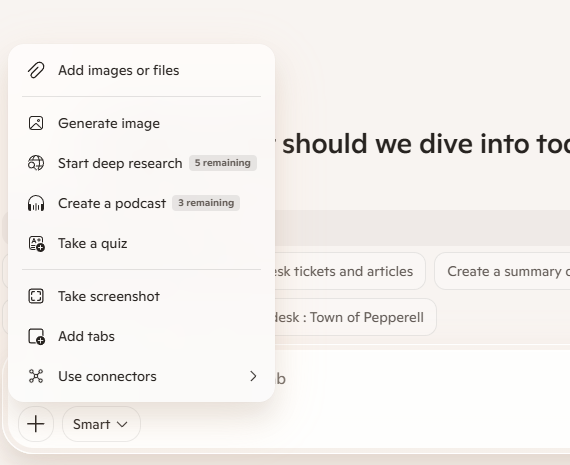
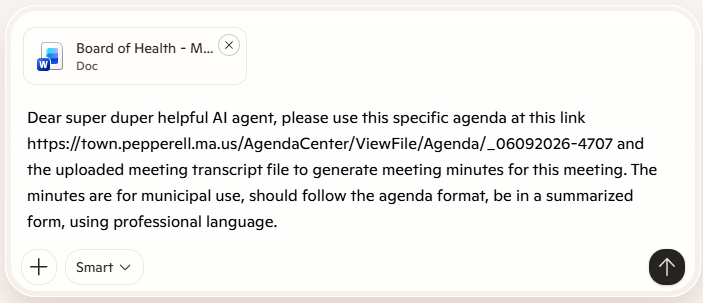
I used the + button in MS Copilot to add the file (transcript) to my prompt)
In my example I used this specific prompt:
Dear super duper helpful AI agent, please use this specific agenda at this link https://town.pepperell.ma.us/AgendaCenter/ViewFile/Agenda/_06092026-4707 and the uploaded meeting transcript file to generate meeting minutes for this meeting. The minutes are for municipal use, should follow the agenda format, be in a summarized form, using professional language.
3) Convert Transcript into Minutes
Let the AI do its thing, often the process takes 10 seconds or less.
With zero extra prompts and work it created this specific document, only you can be the judge of whether it is good, bad, useful or will lead to robot uprising.
Town of Pepperell – Board of Health
Meeting Minutes June 9, 2026 – 6:33 PM Remote Meeting Recorded by Pepperell Community Media
1. Call to Order
Chair Stephen Themelis called the meeting to order at 6:33 PM. Meeting was recorded for later broadcast. Members present: Stephen Themelis, Renee D’Argento. Health Agent: Kalene Gendron, RS.
2. Approval of Minutes – May 12, 2026
Motion by D’Argento to approve the minutes of May 12, 2026.
Second by Themelis.
Vote: 2–0, motion passed.
(Transcript reference: “I make a motion to approve the minutes…”)
3. 140 Chestnut Street – Well Variance Request
Applicants Bob and Robyn Accomazzo requested relief from the 50‑ft property line setback to install a replacement well.
The only abutter is their son, who provided written consent.
Health Agent Gendron noted the home currently has no water, constituting an emergency.
Requested relief: 25 feet.
Motion: Approve 25 feet of relief for well placement. Vote: 2–0 approved.
(Transcript reference: “…they’re in a situation where they have no water in their home…”)
4. Continued Public Hearing – Odor Complaints, 57 Nashua Road (Lomar Park / Composting Operation)
This item continued from the prior meeting.
4.1 Applicant/Property Owner Presentation
Attorney Robert Cirillo and consultant Matt Marro presented:
FOIA documents received earlier that day.
Argument that the site has been used for material storage for decades and should be considered grandfathered.
Assertion that odors are sporadic, not continuous.
Claim that other composting operations exist in town.
Marro stated aerial imagery shows a long‑standing disturbed footprint and argued the disputed activity is not within riverfront jurisdiction.
(Transcript reference: “The imagery has consistently shown a long‑standing developed corridor…”)
4.2 Health Agent Comments
Health Agent Gendron:
Reiterated her recommendation to uphold the cease and desist unless the operator obtains a DEP exemption or valid permit.
Noted that during her neighborhood inspection, odors were “punching you in the face” on Merrimack Drive.
Confirmed flies and odors were present during the joint site visit.
4.3 Public Comment
Multiple residents from Merrimack Drive, Deerfield Drive, and abutting conservation land provided testimony. Key themes:
Odors began in late 2025, intensifying in spring 2026.
Residents described the smell as severe, daily, and inhibiting outdoor use.
Reports of large numbers of flies, inability to open windows, and diminished enjoyment of property.
Long‑term residents stated the current composting activity is new and not consistent with historical site use.
(Transcript reference: “I can’t open my windows… thousands of flies…”)
4.4 Board Discussion
Members discussed the distinction between zoning, public health, and wetlands issues.
Both members agreed that zoning must be resolved first, as composting is not a permitted use in any district under Pepperell’s bylaws.
The Board noted the Building Commissioner’s December 2025 and June 4, 2026 cease‑and‑desist orders stating the operation is not permitted and not grandfathered.
4.5 Motion
Motion: Continue the public hearing pending a decision from the Zoning Board of Appeals regarding the use. Vote: 2–0 to continue. The Building Commissioner’s cease and desist remains in effect.
5. DPW – Annual Sanitary Survey
Health Agent Gendron informed the Board that:
The annual sanitary survey is completed by DPW.
The Board does not typically receive the full report but should begin reviewing these documents for awareness.
6. Health Agent’s Report
Health Agent Gendron provided updates:
Beach Season: NWRA continues weekly sampling at Nicetous (Prescott) and Heald Pond.
Rats Page: Website update delayed due to staffing but in progress.
Tick Season: High activity; recommended linking Neshoba Board of Health resources to Town website.
Town Nurse: Regional nursing hours changed, but Pepperell’s hours remain the same.
7. Next Meeting
Tentative meeting held for June 23, 2026, pending ZBA activity.
Regular July meeting scheduled for July 14, 2026.
8. Adjournment
Motion to adjourn by D’Argento, second by Themelis. Vote: 2–0. Meeting adjourned at 7:31 PM.
Once you are happy with the result (for a 10 second waiting and 2 minutes of clicking I'd be ecstatic with the above), copy & paste it into MS Word and do your formatting/font/minor edits there.
4) Review for Accuracy
This step is critical. You cannot trust any AI agent to be 100% accurate, you should still listen to the meeting or look at your notes to confirm all specific details, dates, times, names, addresses, votes.. remember, this is based in many instances on a recording from potentially a noisy room with 1 camera/microphone, people speaking over each other, it is entirely likely that something important may have been missed or that transcript is simply incorrect.
Never trust AI without proof-reading the result.
5) Additional Notes
- You can continue to tweak the prompt, tell it to use longer descriptions for example
- Maybe you want it as 1 page doc
- Maybe you want it to focus on one specific part of the meeting and make that longer/shorter
- Maybe you don't like the format, numbering etc..
- Tell it to correct spelling of something Pepperell specific... like "Nissitissit" etc..
- Just ask it as you would a person to make an adjustment.
Was this article helpful?
That’s Great!
Thank you for your feedback
Sorry! We couldn't be helpful
Thank you for your feedback
Feedback sent
We appreciate your effort and will try to fix the article